














































































































What Is MetaTrader 4?
MetaTrader 4 (MT4) is a trading and market-analysis platform widely used in retail forex. Traders connect it to an account from a compatible broker to view prices, analyze charts, place orders, and monitor positions.
MT4 includes live bid and ask prices, multiple chart timeframes, technical indicators, drawing tools, market and pending orders, Stop Loss and Take Profit functions, account history, and automated trading through Expert Advisors.
MT4 is the software interface; the broker provides the trading account, instruments, pricing, spreads, leverage, and execution conditions.
Demo vs Live MT4 Accounts
A demo account uses simulated funds and is useful for practising charts, orders, stops, and position sizing. A live account uses real money. Demo trading can teach platform mechanics, but live execution and the psychological impact of risking capital can differ.
Understanding the MetaTrader 4 Interface
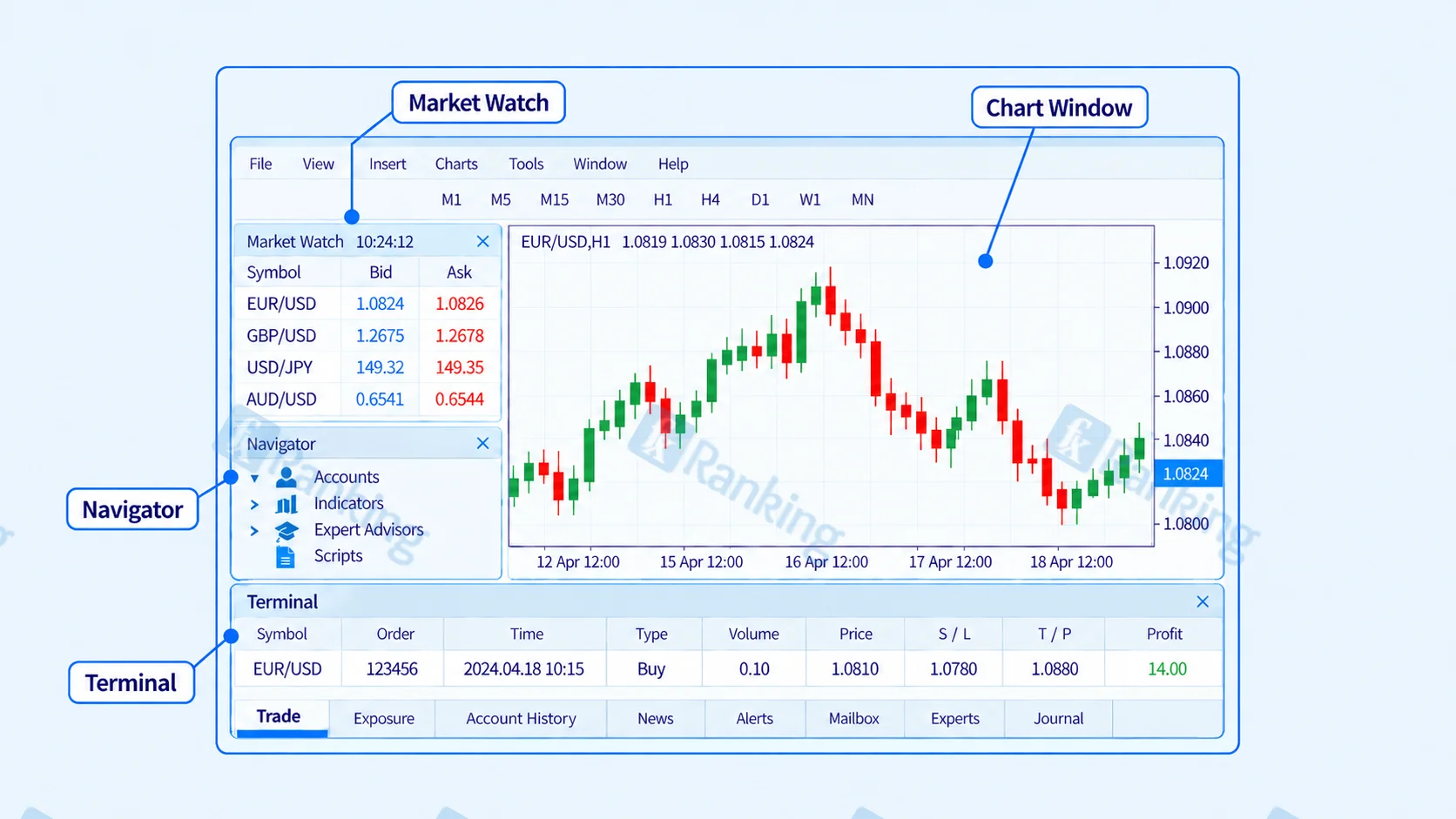
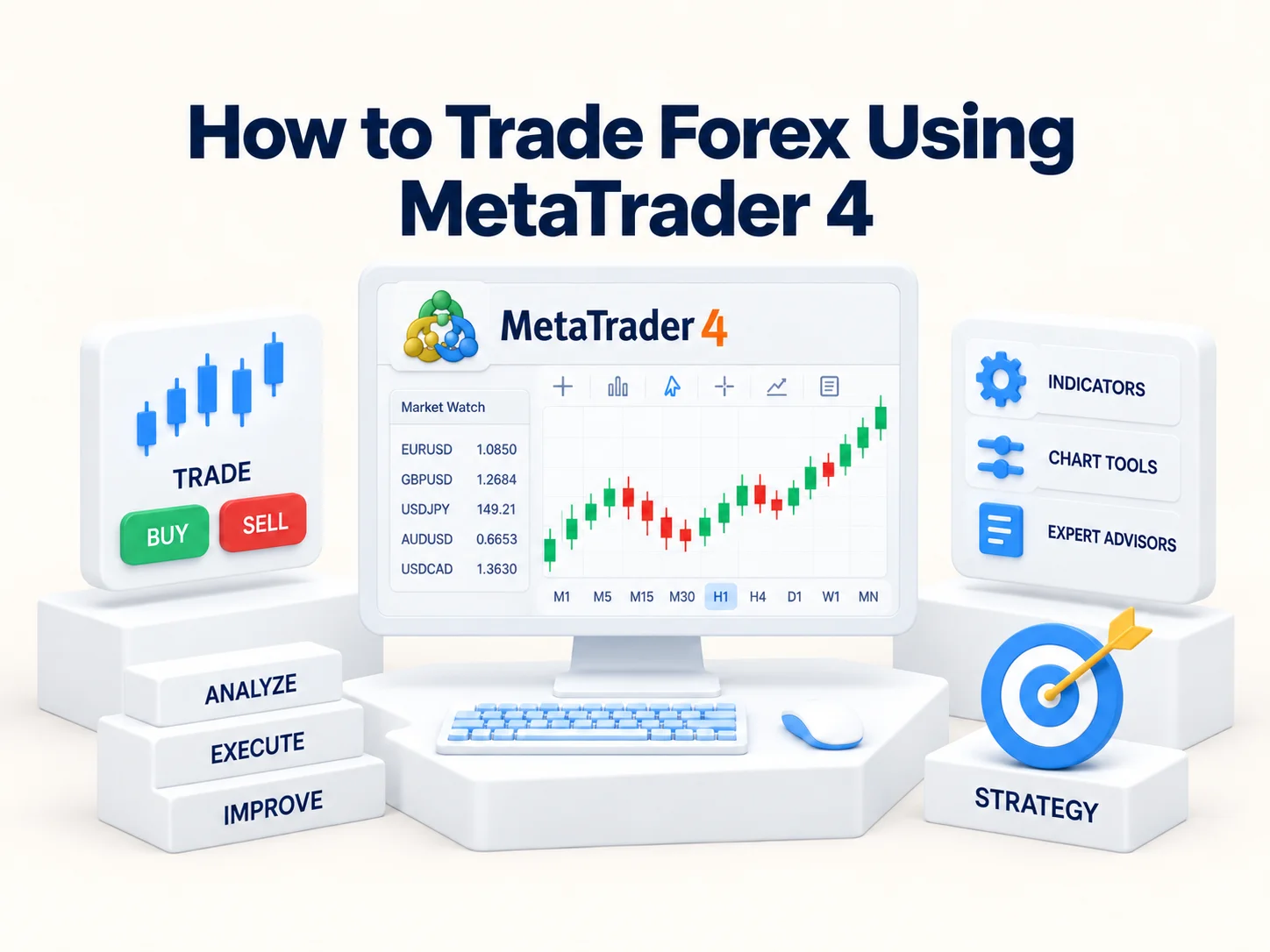
Most manual forex trading in MT4 happens through four main areas.
Market Watch
Market Watch displays the symbols available through your broker and their current bid and ask prices.
You may see symbols such as:
- EUR/USD
- GBP/USD
- USD/JPY
- AUD/USD
The exact list depends on the broker. Some brokers also add suffixes or prefixes to symbols.
Chart Window
The chart shows price movement over time. Candlestick charts are common because each candle displays the open, high, low, and close for the selected period. For example, on a one-hour chart, each candle represents one hour of price action.
Navigator
The Navigator contains accounts, indicators, scripts, and Expert Advisors. Indicators can usually be added to charts from here.
Terminal Window
The Terminal shows open positions, pending orders, account history, and other account information. For a manual trader, the Trade tab is particularly important because it shows active positions and their current profit or loss.
How Forex Prices Work in MT4
Forex quotes display a bid and ask price. The bid is generally the price at which you can sell, while the ask is the price at which you can buy. The difference is the spread.
Spread Example
Suppose EUR/USD is quoted as:
Bid: 1.0848
Ask: 1.0850
the spread is 0.0002, or two pips. Note that the spread is one trading cost; some account types may also charge commission.
How to Open a Forex Chart in MetaTrader 4
Before placing a trade, most traders first open the chart of the currency pair they want to analyze.
A simple MT4 chart workflow is:
- Find the currency pair in Market Watch.
- Open its chart.
- Select a timeframe.
- Choose a chart style, such as candlesticks.
- Add only the technical tools needed for your approach.
A beginner should avoid filling the chart with unnecessary indicators. Price structure, support and resistance, and one or two relevant indicators are often easier to interpret than a screen covered with conflicting signals.
Choosing a Timeframe on MT4
A timeframe determines how much market activity each candle represents. MT4 offers timeframes from one minute to one month.
| Timeframe | Typical Use |
|---|---|
| M1–M15 | Short-term trading and entry analysis |
| M30–H1 | Intraday analysis |
| H4 | Broader swing and trend analysis |
| D1 and above | Longer-term market structure |
These are common uses, not fixed rules. Traders may analyze a higher timeframe first and then use a lower one to refine an entry; for example, identifying an H4 uptrend before looking for an H1 pullback.
How to Place a Forex Trade on MetaTrader 4
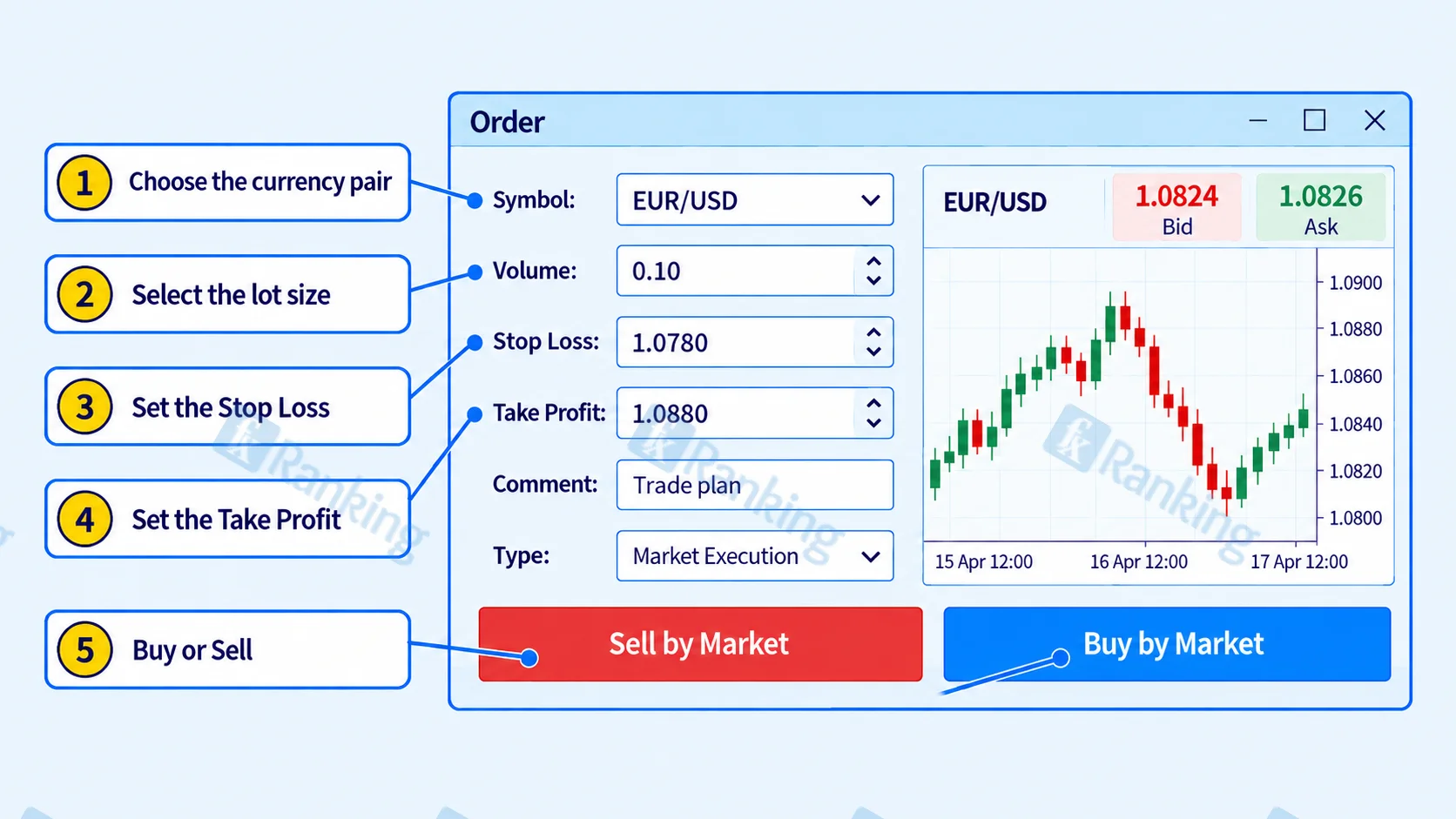
The MT4 order window normally includes the symbol, volume, Stop Loss, Take Profit, and order type.
Step 1: Choose the Currency Pair
Confirm that the correct symbol is selected before placing the order.
Accidentally trading GBP/USD when the analysis was performed on EUR/USD is a basic operational error that can be avoided by checking the ticket before submission.
Step 2: Select the Lot Size
The Volume field controls position size. A common forex convention is:
- 1.00 lot = 100,000 units
- 0.10 lot = 10,000 units
- 0.01 lot = 1,000 units
Exact limits vary by broker and instrument. Position size should be based on planned risk rather than choosing a convenient-looking lot size.
Step 3: Set the Stop Loss
A Stop Loss is intended to close a trade if price moves against the position. It should normally sit near a level where the original trade idea becomes invalid.
Stops do not guarantee an exact exit price. During gaps or fast markets, execution can occur at a different price because of slippage.
Step 4: Set the Take Profit
A Take Profit instructs the platform to close the position when a specified favorable price is reached.
Traders often choose profit targets using market structure, previous highs or lows, support and resistance, or a predefined risk-to-reward framework.
Step 5: Buy or Sell
Choose Buy when the plan expects the base currency to strengthen against the quote currency, and Sell when it expects the base currency to weaken. For EUR/USD, buying means expecting the euro to strengthen against the US dollar.
Market Orders vs Pending Orders in MT4
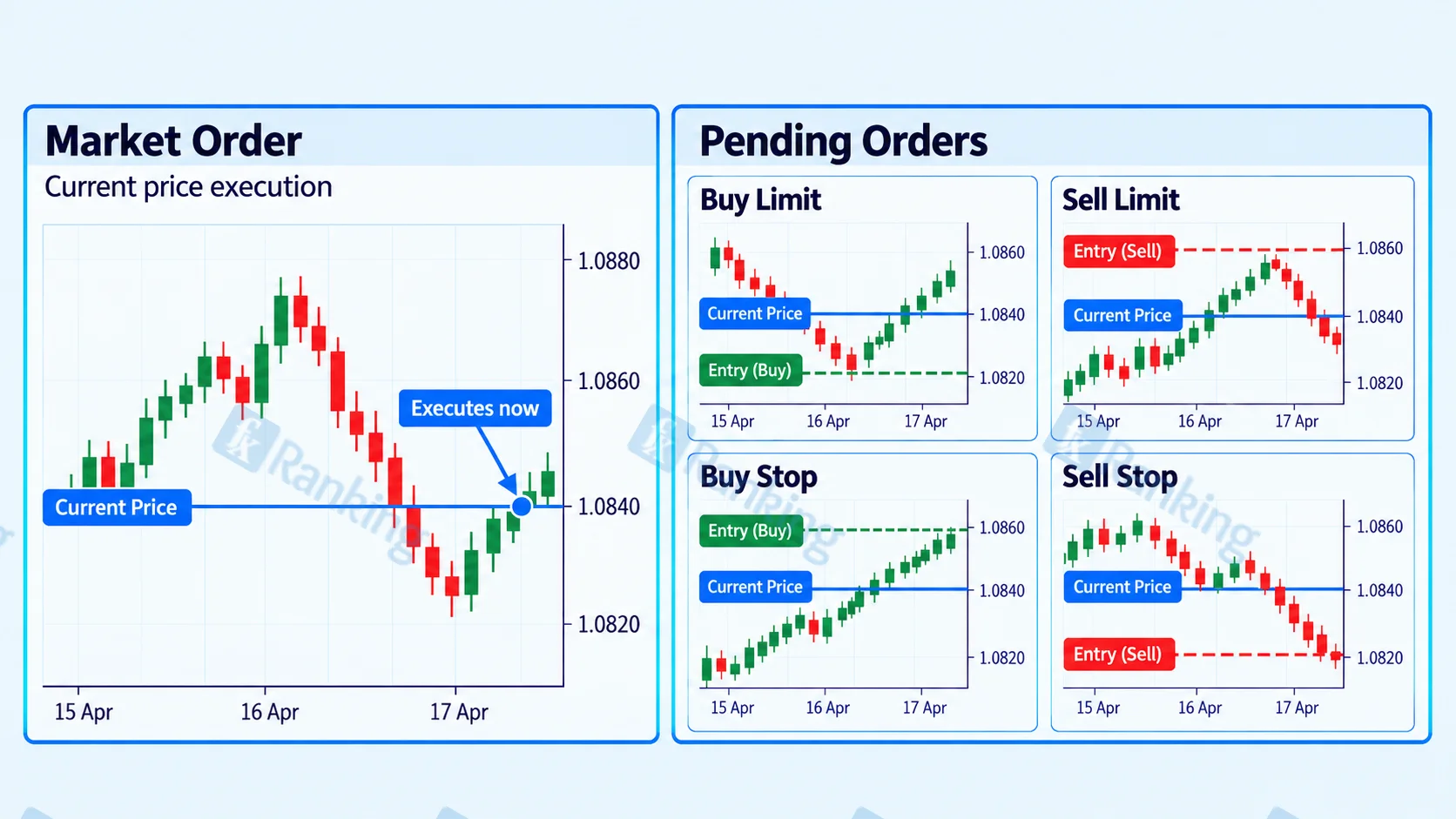
A market order enters a position around the currently available market price, while a pending order waits for price to reach a specified level before triggering. MT4 provides four commonly used pending-order types:
| Order | Basic Purpose |
|---|---|
| Buy Limit | Buy below the current price |
| Sell Limit | Sell above the current price |
| Buy Stop | Buy above the current price |
| Sell Stop | Sell below the current price |
Limit orders are often used for planned pullback entries, while stop orders may be used for entries after price moves beyond a level. Note that these are order-entry tools, not strategies by themselves.
How to Monitor an Open Trade in MT4
Active positions appear in the Trade section of the Terminal, where traders can monitor entry price, current price, Stop Loss, Take Profit, and floating profit or loss.
Positions can be modified when the trading plan calls for it, but moving a Stop Loss farther away simply because a trade is losing increases the original risk.
Trailing Stops
MT4 also includes a trailing-stop function. A trailing stop can move the protective stop as price travels in the trade's favor. Traders sometimes use it to protect part of an unrealized gain while allowing the position room to continue.
A trailing stop does not guarantee a profitable exit and may close a trade during an ordinary pullback if the trailing distance is too tight.
Using Technical Indicators on MetaTrader 4
MT4 contains built-in technical indicators that can be applied directly to a chart.
Common examples include:
- Moving averages
- Relative Strength Index (RSI)
- MACD
- Bollinger Bands
- Average True Range
Indicators transform historical price information into a different visual form. They do not know where the market will move next. A moving average, for example, can help show general trend direction, while ATR can describe recent volatility.
They are most useful when they support a defined trading process instead of being stacked together in search of a guaranteed signal.
Automated Forex Trading With Expert Advisors
MT4 supports automated programs called Expert Advisors (EAs). An EA can analyze predefined conditions, manage positions, or submit trades automatically.
Automation does not remove trading risk. A strategy that worked on historical data may behave differently when spreads, slippage, volatility, or market conditions change.
Before using an EA with real money, understand its trading rules, position sizing, and potential losses.
Risk Management When Trading Forex on MT4
MT4 makes placing a trade easy. That convenience can become a problem if a trader enters positions without calculating risk.
A basic risk-management process is:
- Determine account balance or equity.
- Set the maximum acceptable risk.
- Identify where the trade idea becomes invalid.
- Calculate the stop distance.
- Calculate the appropriate lot size.
- Enter only if the resulting risk is acceptable.
Leverage allows traders to control positions larger than their deposited capital, magnifying both gains and losses. Available leverage and margin requirements vary by broker, account, instrument, and regulation.
Common Mistakes When Using MetaTrader 4
Entering the Wrong Lot Size
Always check the Volume field before submitting an order. Confusing 0.10 with 1.00 lot can increase exposure substantially.
Trading Without a Stop Plan
Entering first and deciding where to exit later makes risk difficult to control.
Confusing Platform Skills With Trading Skills
Knowing MT4 does not create a profitable strategy. Analysis, discipline, and risk management are separate skills.
Using One-Click Trading Carelessly
One-click trading can submit orders quickly. Speed is useful for some traders, but accidental orders are easier when confirmation steps are removed.
Overloading Charts With Indicators
More indicators can create redundant or conflicting information rather than better decisions.
Ignoring Broker Conditions
MT4 provides the interface, but the broker determines spreads, commissions, symbols, margin requirements, and execution conditions.
Advantages and Limitations of MetaTrader 4 Forex Trading
Common advantages include:
- A relatively straightforward trading interface
- Multiple chart timeframes
- Built-in technical indicators
- Market and pending orders
- Stop Loss, Take Profit, and trailing-stop tools
- Support for Expert Advisors and custom indicators
There are also limitations. Platform features do not compensate for poor risk management, and execution quality depends partly on the broker and market conditions. MT4 also cannot turn an untested trading idea into a reliable strategy simply because it can automate it. Traders should therefore evaluate the platform and the broker separately.
How to Trade Forex Using MetaTrader 4: Key Takeaways
- MT4 is a platform for analyzing markets, placing orders, and managing trades.
- Market Watch shows symbols and bid/ask prices.
- The Volume field controls position size and should be based on risk.
- Stop Loss and Take Profit orders help define planned exits.
- MT4 supports market and pending orders.
- Indicators and Expert Advisors are tools, not guarantees of profitable trading.
- Broker-specific spreads, leverage, lot limits, and execution conditions should be checked separately.
Conclusion
Learning MT4 is mainly about turning a trading plan into a correctly sized and managed order. Once Market Watch, charts, volume, order types, stops, targets, and the Terminal are familiar, the platform itself becomes relatively straightforward.
MT4 should be used as an analysis and execution tool, not as a substitute for a trading process. Clear setups, appropriate position sizing, and predetermined risk matter more than order-entry speed.
FAQs
Is MetaTrader 4 good for beginners?
MT4 can be suitable for beginners once its main windows and order controls are understood. A demo account lets new traders practice charts, orders, stops, and position sizing without immediately risking real money.
How do I place a forex trade on MetaTrader 4?
Select the currency pair, analyze the chart, open the order window, enter the calculated volume, Stop Loss, and Take Profit, then choose Buy or Sell according to the trading plan.
What lot size should a beginner use on MT4?
There is no universal beginner lot size. Position size should depend on account size, stop distance, the instrument, and the amount of capital the trader is prepared to risk.
Can MetaTrader 4 trade automatically?
Yes. MT4 supports Expert Advisors that can automate predefined trading and trade-management rules. Automation still carries risk and should be understood and tested before live use.
What is the difference between a market order and a pending order?
A market order attempts to enter at the current available price. A pending order waits for the market to reach a specified price before its conditions are triggered.
Does MetaTrader 4 provide the forex trading account?
No. MT4 is the trading software. A compatible broker provides the account, tradable instruments, prices, spreads, leverage, and execution environment.

Amy Baily
Amy Baily is a Forex education writer with over nine years of experience in trading and market analysis. She focuses on risk management, trading psychology, and the importance of maintaining a disciplined approach to the markets.