


























































































































What Is Forex Flex EA?
Forex Flex EA is a commercial Expert Advisor developed and maintained since 2012. It operates on MetaTrader 4 and MetaTrader 5 and automates market analysis, trade entry, and position management.
The software includes 12 selectable strategies rather than relying on one fixed trading configuration.
Its defining feature is a mechanism called virtual trades. The Expert Advisor monitors simulated positions before committing real capital to the market.
Forex Flex EA History
Forex Flex EA has been developed by the same team since 2012, placing it among the longer-running commercial Expert Advisors in the retail MetaTrader market.
A long development history demonstrates product continuity. It does not measure profitability or risk.
Trading quality still has to be assessed through account performance, drawdown, position sizing, and execution behaviour.
What Are Virtual Trades?
Virtual trades are simulated positions that Forex Flex EA monitors internally before opening a real market position.
The system uses these simulated trades to observe live price behaviour before capital is committed.
The virtual-trade mechanism therefore acts as an entry filter. It separates initial market signals from the point at which the Expert Advisor opens a real position.
Virtual trades are not the same as demo trades. They form part of the EA's internal trading process while the software operates on a live market feed.
How Forex Flex EA Works
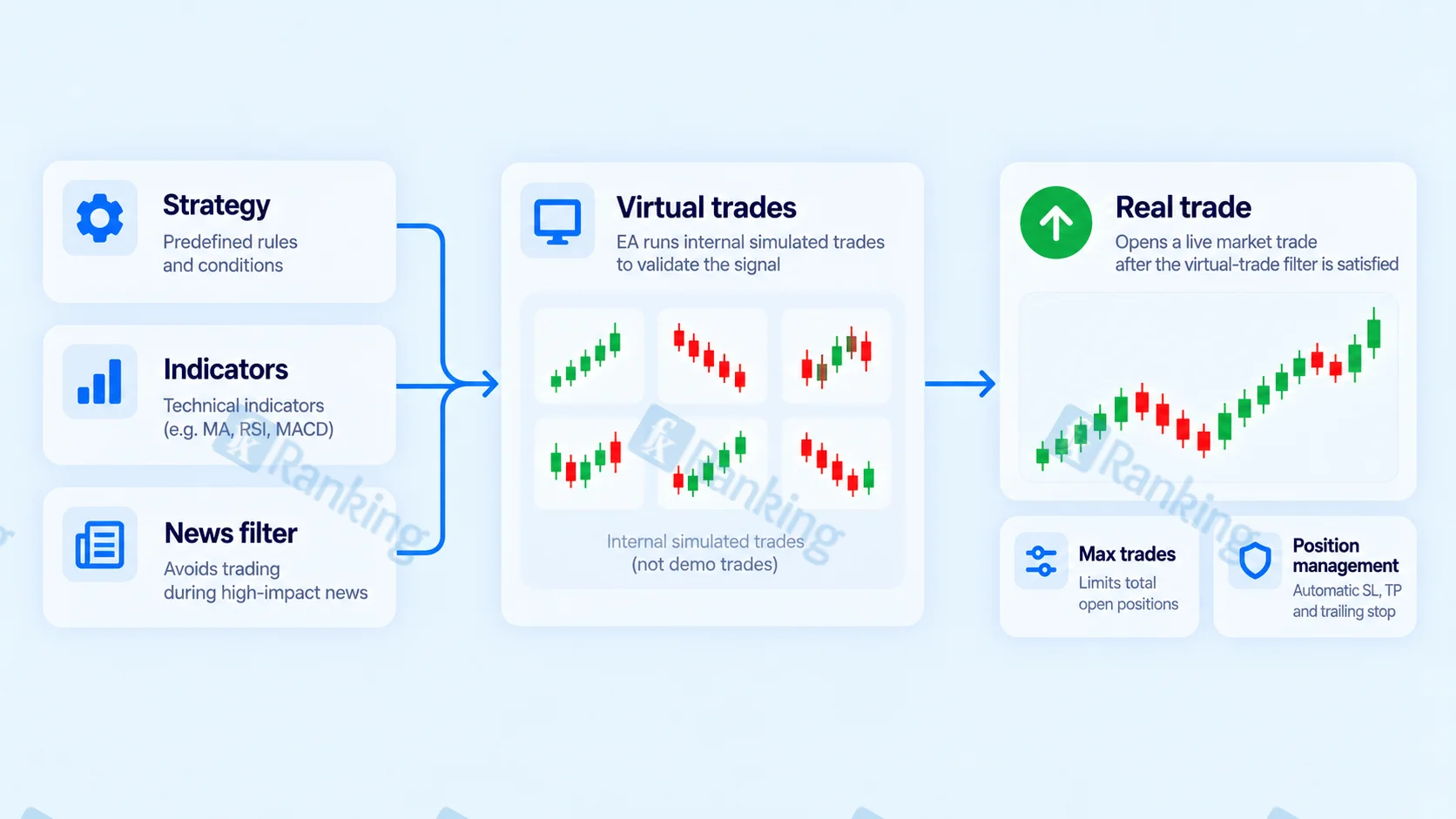
Forex Flex EA combines virtual-trade filtering, selectable trading strategies, technical indicators, and configurable position-management rules.
The trader selects the strategy and risk parameters. The Expert Advisor then performs the market analysis, trade entry, and position management automatically.
Grid and Martingale Elements
Forex Flex EA includes position-management features associated with grid and martingale-style trading.
The software supports multiple simultaneous buy and sell positions and includes a lot multiplier that controls how position size changes during a trading sequence.
These features make total account exposure more important than the result of a single trade.
When several positions remain open at the same time, account risk is determined by the combined exposure of the entire position group.
An extended adverse market move therefore affects all related open positions and increases equity drawdown across the sequence.
Strategy Selection
Forex Flex EA includes 12 built-in strategies.
Strategies and set files are selected through the EA rather than requiring the trader to rebuild the trading logic manually.
Each strategy represents a distinct configuration. Performance from one Forex Flex EA strategy should therefore be evaluated separately from the performance of another.
Strategy name, settings, currency pairs, and risk parameters need to match the account whose performance is being studied.
Indicators and Market Filters
Forex Flex EA includes configurable technical indicators such as:
- Bollinger Bands
- Stochastic
- Momentum
- RSI
These indicators can be enabled or disabled as part of the strategy configuration.
The EA also includes a news filter that restricts new trading around major scheduled economic releases.
Indicator and filter settings form part of the trading strategy because they change the conditions under which the Expert Advisor is allowed to enter the market.
Currency Pairs
Forex Flex EA is a multi-pair Expert Advisor.
Documented currency pairs include EURUSD, GBPUSD, USDJPY, EURCHF, AUDUSD and EURGBP.
Multi-pair trading increases the number of available trading opportunities, but it also introduces correlation risk.
Several positions involving the same currency can respond to the same underlying market movement. Forex Flex EA includes a currency-exposure control to restrict this concentration.
Entry and Exit Logic
Forex Flex EA combines its selected strategy conditions with the virtual-trade process before opening real positions.
The documented default setting monitors approximately six virtual trades per currency pair before a real position is opened.
Reducing the virtual-trade count increases trading frequency because less simulated activity is required before entry. Increasing the count creates a more selective entry process.
The EA also includes controls for maximum buy and sell positions, currency exposure, hedging and news filtering.
These settings affect both the number of trades taken and the amount of capital exposed when positions are active.
Forex Flex EA Setup and Installation
Platform Requirements
Forex Flex EA supports MetaTrader 4 and MetaTrader 5.
The trading platform must remain connected while the Expert Advisor monitors virtual trades and manages live positions.
Continuous operation therefore requires either an always-on trading computer or a Virtual Private Server.
Step-by-Step Installation
- Install the appropriate Forex Flex EA package for MetaTrader 4 or MetaTrader 5.
- Place the Expert Advisor files in the platform's Experts folder.
- Restart or refresh MetaTrader so the EA appears in the Navigator.
- Attach Forex Flex EA to the intended chart or charts.
- Select one of the 12 strategies or load the required set file.
- Review the position-management settings, especially lot multiplier, maximum trades and currency exposure.
- Configure the required indicators and filters.
- Run the strategy on a demo account before introducing real capital.
- Keep the trading platform continuously connected while the Expert Advisor is active.
Demo testing is particularly important with a configurable Expert Advisor because changing strategies and risk parameters changes the behaviour of the system.
Forex Flex EA Settings
Forex Flex EA provides extensive control over strategy behaviour and account exposure.
The most important settings affect strategy selection, virtual-trade filtering, position limits, position sizing, currency concentration, hedging and news-event management.
| Setting | Function | Why It Matters |
|---|---|---|
| Strategy selector | Selects one of the 12 built-in strategies or set files. | Determines the trading configuration used by the Expert Advisor. |
| Virtual trades count | Controls the number of simulated trades monitored before a real entry. | Changes trade frequency and entry selectivity. |
| Max buy/sell trades | Limits simultaneous open positions on a currency pair. | Restricts the amount of grid exposure that can accumulate. |
| Lot multiplier | Controls position-size scaling during the trading sequence. | Determines how quickly financial exposure increases. |
| Currency exposure limit | Restricts simultaneous positions involving the same currency. | Controls concentration across correlated currency pairs. |
| Hedging | Enables opposing positions where the trading environment permits hedging. | Changes how open exposure is managed. |
| News filter | Restricts new trades around major scheduled economic events. | Reduces new entries during high-volatility news periods. |
Virtual-Trade Count
The documented default virtual-trade count is six per currency pair.
Lowering the value reduces the amount of filtering required before a real position is opened.
Raising the value increases the amount of simulated trade activity required before entry.
The setting therefore controls entry selectivity and trading frequency.
Currency-Exposure Control
The documented default currency-exposure limit restricts simultaneous exposure to two USD pairs.
This setting controls correlation risk.
Several positions involving USD can react to the same dollar movement. Restricting common-currency exposure prevents the account from concentrating too heavily on one underlying market direction.
Hedging
Hedging is disabled by default.
When enabled in a compatible trading environment, hedging allows opposing positions to remain open simultaneously.
Hedging changes the structure of open exposure. It does not remove trading risk or eliminate drawdown.
Forex Flex EA Risk and Position Sizing
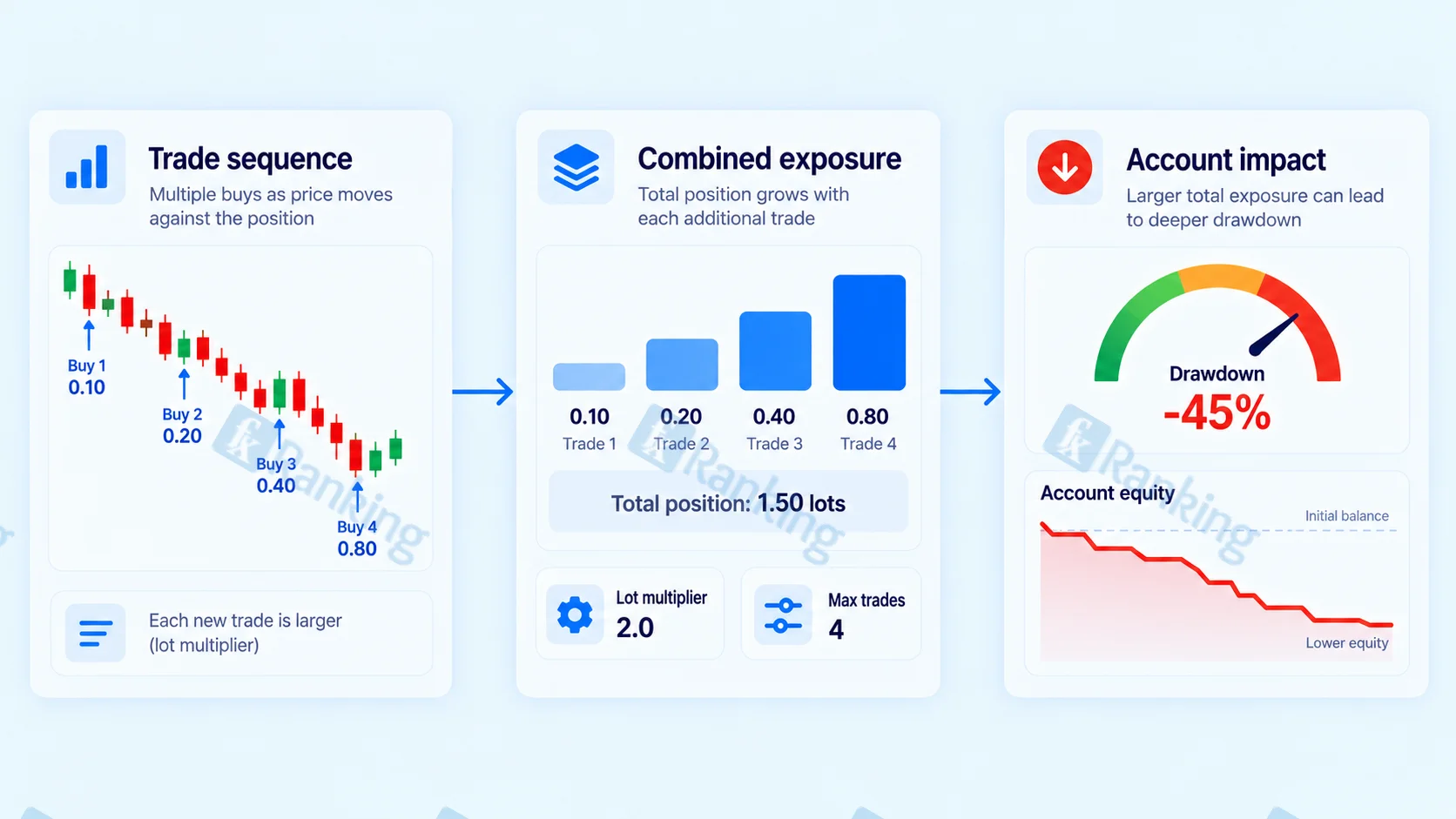
Risk management is central to Forex Flex EA because its position-management structure allows multiple trades and changing lot sizes within a sequence.
The two most important exposure controls are lot multiplier and maximum buy/sell trades.
Lot Multiplier
The lot multiplier controls how position size changes as the trading sequence develops.
A larger multiplier increases financial exposure more quickly.
This magnifies both favourable and adverse price movement.
The multiplier does not improve the quality of the entry signal. It changes the amount of capital placed behind the strategy.
Maximum Open Trades
Maximum buy and sell settings limit the number of positions that can remain open on one currency pair.
Allowing more open positions increases the amount of exposure that can accumulate during an extended market move.
Maximum trades and lot multiplier should therefore be analysed together.
Why Grid Drawdown Needs Special Attention
Grid-style drawdown is created by the combined effect of several open positions.
An individual trade can show a limited loss while the complete group of open positions carries substantially greater unrealized exposure.
Account-level equity drawdown therefore provides more useful risk information than the result of a single position.
VPS and Continuous Operation
Forex Flex EA needs a continuous MetaTrader connection while it monitors virtual trades and manages active positions.
A Virtual Private Server keeps MetaTrader running without requiring a personal computer to remain online.
A VPS improves uptime and operational continuity. It does not improve entry quality or reduce the risk created by position sizing and open exposure.
How to Evaluate Forex Flex EA Performance
Forex Flex EA should be evaluated strategy by strategy rather than as one uniform trading system.
Different strategy selections, lot multipliers, maximum-trade limits and currency configurations create different return and drawdown profiles.
Live MyFXBook Accounts
The Forex Flex EA developer links trading accounts hosted on MyFXBook and associates individual accounts with named strategies.
Examples include strategy-specific accounts such as TDI Slope H1 and SR Aggro.
This structure allows performance to be analysed at strategy level instead of treating every Forex Flex EA configuration as identical.
A live account documents the behaviour of its specific strategy, settings and trading conditions. Its results should not automatically be assigned to the other strategies inside the software.
How to Read a Live Forex Flex EA Account
A live account should be analysed through its complete account history rather than through headline return alone.
Important figures include:
- Total return
- Maximum drawdown
- Account age
- Current account status
- Position size
- Number of simultaneous positions
- Deposit and withdrawal history
- Strategy name
A verified account confirms the trading history displayed by the tracking service. It does not guarantee that the same return or drawdown will occur in the future.
Account status also matters. A completed or inactive account represents historical performance, while an active account provides continuing forward data.
Forex Flex EA Drawdown and Risk
Drawdown is one of the most important measurements when analysing Forex Flex EA because several positions can remain open simultaneously.
Each Forex Flex EA strategy has its own position sizing, trade frequency, and exposure structure.
Drawdown should therefore be evaluated on the specific strategy and trading account being studied.
Balance vs Equity Drawdown
Account balance reflects closed trading results. Account equity also includes the unrealized profit and loss of open positions.
This distinction is particularly important for grid-style position management because several open trades can carry unrealized losses before the trading sequence closes.
Equity drawdown therefore shows how much account capital is under pressure while positions remain active.
Strategy Settings and Drawdown
Lot multiplier, maximum open trades, and currency-exposure limits directly influence drawdown.
A larger multiplier increases position size more quickly.
A higher maximum-trade limit allows more positions to accumulate.
Broader currency exposure allows more markets to affect account equity at the same time.
These settings should be assessed together because they determine the total risk created by the strategy.
How to Evaluate Forex Flex EA Reviews
Forex Flex EA has a substantial public review history compared with many commercial Expert Advisors.
ForexPeaceArmy recorded more than 89 user reviews in the source material used for this article.
User reviews provide information about installation, support, settings and individual trading experiences. They do not replace structured account-level performance data.
User Reviews vs Performance Data
Individual traders use different strategies, position sizes, currency pairs, brokers and account balances.
A single trader's result therefore represents that specific configuration rather than the standard performance of the entire Forex Flex EA product.
User feedback is most useful for identifying recurring operational themes.
Performance analysis requires trading data showing returns, drawdown, open exposure and the strategy settings responsible for those results.
Affiliate Reviews
Several websites publishing Forex Flex EA reviews earn referral commissions from product sales.
A commercial relationship creates a financial incentive around the recommendation.
Trading claims should therefore be evaluated through the underlying account data rather than through promotional language.
Forex Flex EA and Prop-Firm Trading
Forex Flex EA includes a dedicated version designed around FTMO-style prop-firm requirements.
Prop-firm accounts impose strict limits on daily losses and total drawdown.
These limits make position sizing and open exposure particularly important for a system that supports multiple simultaneous positions.
A prop-firm configuration changes the risk controls used by the software. It does not remove the underlying trading risk.
Forex Flex EA Key Facts
| Category | Forex Flex EA |
|---|---|
| Development History | Developed since 2012 |
| Platforms | MetaTrader 4 and MetaTrader 5 |
| Core Mechanism | Virtual-trade filtering |
| Position Management | Grid-style with lot-multiplier functionality |
| Built-In Strategies | 12 |
| Documented Indicators | Bollinger Bands, Stochastic, Momentum and RSI |
| Documented Currency Pairs | EURUSD, GBPUSD, USDJPY, EURCHF, AUDUSD and EURGBP |
| Default Virtual Trades | 6 per currency pair |
| Default USD Exposure Limit | 2 pairs |
| Hedging Default | Off |
| News Filter | Included |
| Live Performance Records | Developer-linked MyFXBook accounts tied to individual strategies |
| Prop-Firm Version | Dedicated FTMO-oriented configuration |
What Forex Flex EA Teaches About Expert Advisors
Forex Flex EA illustrates several important principles for evaluating advanced commercial Expert Advisors.
First, strategy configuration matters. Forex Flex EA contains 12 strategies, so the software does not have one universal performance profile. Results need to be linked to the strategy and settings that produced them.
Second, entry filtering and risk management are separate functions. Virtual trades determine when real positions are opened. Lot multiplier, maximum open trades, and currency-exposure limits determine how much risk develops after positions are active.
Third, grid exposure should be analysed at account level. Several positions can form one trading sequence, making equity drawdown more informative than the result of any single trade.
Fourth, live-account transparency still requires context. A MyFXBook account documents the performance of one strategy and one configuration. It does not represent every strategy inside Forex Flex EA.
Fifth, more settings create more responsibility. Position sizing, trade limits, indicators, and filters all change the behaviour of the Expert Advisor.
Finally, automated-trading performance cannot be reduced to one statistic. Return, equity drawdown, position exposure, strategy identity and account history all belong in the same analysis.
Forex Flex EA therefore demonstrates a broader rule for configurable Expert Advisors: performance data only becomes meaningful when the exact strategy, settings, and risk structure behind that performance are understood.
FAQs
What Is Forex Flex EA?
Forex Flex EA is an automated trading Expert Advisor for MetaTrader 4 and MetaTrader 5. It combines virtual-trade filtering with 12 selectable strategies and configurable position-management controls.
What Are Virtual Trades in Forex Flex EA?
Virtual trades are simulated positions monitored internally by the Expert Advisor before a real market position is opened. They form part of the EA's entry-filtering process.
Does Forex Flex EA Use Martingale?
Forex Flex EA uses position-management features associated with martingale and grid systems, including lot multipliers and multiple simultaneous positions. These controls directly affect total exposure and drawdown.
What Currency Pairs Does Forex Flex EA Support?
Documented pairs include EURUSD, GBPUSD, USDJPY, EURCHF, AUDUSD and EURGBP. Forex Flex EA supports multi-pair trading rather than being restricted to one currency pair.

Jake Robins
Jake Robins is a Forex and cryptocurrency education contributor with over 10 years of experience helping readers better understand the financial markets. His work covers risk management, technical analysis, trading psychology, broker platforms, and scam awareness. Through clear, practical guidance, Jake helps traders approach the markets with greater discipline, caution, and confidence.